われらが(?) SmarxさんがWindows Azure上でMemcachedを動かすためのNuGet パッケージを作ってくださいました。
早速利用してみましょう。
Memcachedサーバーの設定
今回はWebアプリ上でMemcachedから値を入れたり取得したりするWebアプリを作ります。で、肝心のMemcachedはWebアプリと同じインスタンス上(つまりWeb Role上)で動作させることにします。
さくっとWindows Azureなプロジェクトを作ってもらって、「WazMemcachedServer」を追加します。

追加後はMemcachedとヘルパーがプロジェクトに含まれます。

さて、追加したらWebRole.csにMemcachedを起動するためのコードを追加します。
public class WebRole : RoleEntryPoint
{
	System.Diagnostics.Process proc;
	public override void Run()
	{
		proc.WaitForExit();
	}

	public override bool OnStart()
	{
		proc = WindowsAzureMemcachedHelpers.StartMemcached("Memcached", 512);
		return base.OnStart();
	}
}
次に起動に必要なTCPポート(Internalなエンドポイント)を定義します。

サーバー側はこれだけ。超簡単!!
クライアントの作成
今度はMemcachedを利用するクライアント側の構成です。
今回はASP.NET MVC3なWeb Role(かつMemcachedも動作する)にしましたので、Web Roleなプロジェクトでサーバー側と同様にNuGetから「WazMemcachedClient」を追加します。

Memcachedクライアントのインスタンスはどこで定義してもいいのですが、そうそう変更がないのでApplication_Startに記述するかControllerに記述します。(今回はControllerで定義します)
Memcachedクライアントのインスタンスの生成はこんな感じで。
static MemcachedClient client = WindowsAzureMemcachedHelpers.CreateDefaultClient(
    "SampleWebRole", "Memcached");
引数に指定するロール名、エンドポイント名はちゃんと合わせましょう。
ヘルパーで何をしているかというと、ロール名、エンドポイント名を取得して指定されたポート等で起動したり、クライアント側では各ロールインスタンスの(起動しているであろうMemcachedサーバーの)ポート等を指定して接続を行っています。
なので自前でMemcachedのクラスタ(というんでしょうか)に個別につなぎまわる必要がないのですね。
インスタンス数が変化してもヘルパー側でよしなにしてくれるようです。便利!
さて、今度はMemcachedに値を入れたり取得したりするViewを設定します。
例:
@{
	ViewBag.Title = "ホーム ページ";
}

@using (Html.BeginForm("Index","Home"))
{
		<fieldset>
			<legend>memcachedの操作</legend>

			<div class="editor-label">キー</div>
			<div class="editor-field">
				<input id="key" name="key" type="text" />
			</div>
			<div class="editor-label">値</div>
			<div class="editor-field">
				<input id="value" name="value" type="text" />
			</div>

			<p>
				<input type="submit" name="DoSave" value="保存" />
				<input type="submit" name="DoRead" value="読み込み" />
			</p>
		</fieldset>
}

<div>
<h3>結果</h3>
<p>ホスト名: @ViewBag.HostName</p>
<p>キー: @ViewBag.MemcachedKey</p>
<p>値: @ViewBag.MemcachedData</p>
</div>
お次はController
using System;
using System.Collections.Generic;
using System.Linq;
using System.Web;
using System.Web.Mvc;
using System.Net;

using Enyim.Caching;

namespace SampleWebRole.Controllers
{
	public class HomeController : Controller
	{
		static MemcachedClient client = WindowsAzureMemcachedHelpers.CreateDefaultClient(
			"SampleWebRole", "Memcached");

		public ActionResult Index()
		{
			ViewBag.HostName = Dns.GetHostName();
			return View();
		}

		public ActionResult About()
		{
			return View();
		}

		[ActionName("Index")]
		[SubmitCommand("DoSave")]
		public ActionResult MemcachedSave(string key,string value)
		{
			if (!string.IsNullOrEmpty(key))
			{
				client.Store(Enyim.Caching.Memcached.StoreMode.Set, key, value);
			}

			ViewBag.HostName = Dns.GetHostName();
			ViewBag.MemcachedData = "";

			return View();
		}

		[ActionName("Index")]
		[SubmitCommand("DoRead")]
		public ActionResult MemcachedRead(string key, string value)
		{
			if (!string.IsNullOrEmpty(key))
			{
				ViewBag.MemcachedData = client.Get(key) as string;
			}
			ViewBag.HostName = Dns.GetHostName();
			ViewBag.MemcachedKey = key;

			return View();
		}

	}
}
ボタンで動作を変えるのは「ASP.NET MVCに似合うSubmitの振り分け (無聊を託つ)」を参考にしました。
以下のクラスを追加します。
using System;
using System.Reflection;
using System.Web.Mvc;

namespace SampleWebRole.Controllers
{
	[AttributeUsage(AttributeTargets.Method, AllowMultiple = false, Inherited = true)]
	public class SubmitCommandAttribute : ActionMethodSelectorAttribute
	{
		private string _submitName;
		private string _submitValue;
		private static readonly AcceptVerbsAttribute _innerAttribute =
									 new AcceptVerbsAttribute(HttpVerbs.Post);

		public SubmitCommandAttribute(string name) : this(name, string.Empty) { }
		public SubmitCommandAttribute(string name, string value)
		{
			_submitName = name;
			_submitValue = value;
		}

		public override bool IsValidForRequest(ControllerContext controllerContext,
											   MethodInfo methodInfo)
		{
			if (!_innerAttribute.IsValidForRequest(controllerContext, methodInfo))
				return false;

			// Form Value
			var submitted = controllerContext.RequestContext
											 .HttpContext
											 .Request.Form[_submitName];
			return string.IsNullOrEmpty(_submitValue)
					 ? !string.IsNullOrEmpty(submitted)
					 : string.Equals(submitted, _submitValue,
									 StringComparison.InvariantCultureIgnoreCase);
		}
	}
}
クライアント側は以上で終わりです。簡単!!
実質client.StoreメソッドとGetメソッドだけ、ぐらいのお手軽さです。(本当はもう少し考慮したほうがいいんでしょうけど)
動作確認
では実際にデプロイして試してみます。今回は5インスタンス用意しました。
初回アクセス

ホスト名に注目。キーと値を入れて保存します。
次にキーを入れて読み込みします。

ホスト名が違いますね。つまりWebアプリとしてはロードバランスされてバラバラのインスタンスにアクセスしてますがちゃんとMemcachedに保存した値が取れてます。
さてMemcached側ってどんな感じなんでしょう?
ちょっと確認するためにコンソールクライアントを作ってみてみたいと思います。
※NuGetからEnyimMemcachedをインストールしておいてください。
using System;
using System.Collections.Generic;
using System.Linq;
using System.Text;

using Enyim.Caching;

namespace Client
{
	class Program
	{
		static void Main(string[] args)
		{
			try
			{
				List<string> hosts = new List<string>();

				while (true)
				{
					Console.Write("IP address & port: ");
					string ip = Console.ReadLine();
					if (ip == "") break;
					hosts.Add(ip);
				}

				Console.Write("Key: ");
				string key = Console.ReadLine();

				foreach (string host in hosts)
				{
					var mcc = new Enyim.Caching.Configuration.MemcachedClientConfiguration();
					mcc.AddServer(host);
					mcc.SocketPool.ReceiveTimeout = new TimeSpan(0, 0, 10);
					mcc.SocketPool.ConnectionTimeout = new TimeSpan(0, 0, 10);
					mcc.SocketPool.DeadTimeout = new TimeSpan(0, 0, 20);
					mcc.Protocol = Enyim.Caching.Memcached.MemcachedProtocol.Text;

					using (MemcachedClient client = new MemcachedClient(mcc))
					{
						try
						{
							Console.WriteLine("Host: {0}\tValue: {1}", host, client.Get(key).ToString());
						}
						catch (Exception e)
						{
							Console.WriteLine("Host: {0}\tValue: N/A\t{1}", host, e.Message);
						}
					}
				}

				Console.ReadKey();
			}
			catch (Exception ex)
			{
				Console.WriteLine(ex.Message);
				Console.ReadKey();
			}
		}
	}
}
こんな感じでIP受け取って指定されたキーの値をMemcachedサーバーから取得します。
では実行をば。(MemcachedはInternalなエンドポイントで動作してるのでWeb Role上で実行します。あとIPアドレスは面倒ですが各インスタンス上で取得してください)
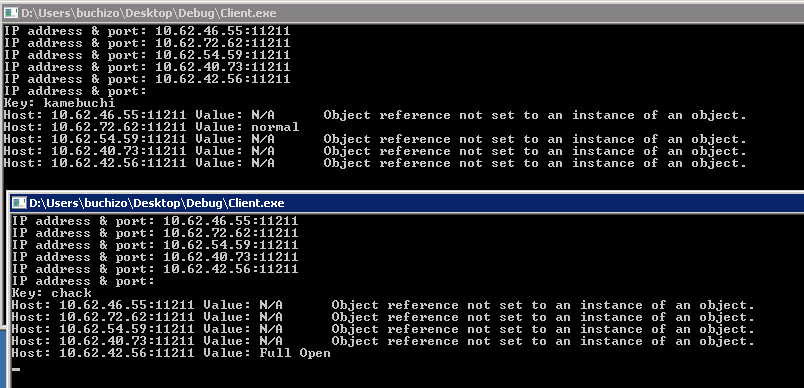
結果は保存先バラバラですね。特に複製もされてません。
まとめ
WazMemcachedServer を使うと簡単にMemcachedをWindows Azure上で動作させられます!
クライアント側もWazMemcachedClientを利用することで接続先を意識せずにロール上のMemcachedにアクセスできるのですごく楽ちんです。
またWindows Azureネイティブ(?)なので、インスタンス数の変動があっても問題ナシ。
ただMemcachedそのものは複製等されませんので、インスタンスがこけるとそこに入っていたデータは無くなります。
ちょっとデータの保持などに癖はありますが、Web Roleのあまりメモリを活用したり、ちょっとしたCacheとして使う分には非常にいいんじゃないでしょうか。
 ブチザッキ
ブチザッキ 
ピンバック: Windows Azure上のMemcached « S/N Ratio (by SATO Naoki)