というときのTipsみたいなもの。今回の前提条件は
- Azure ADにアプリケーションの登録をしたくない。
- 対話ログインOK、ただしMFAが必要。
というところです。
続きを読むAzrue Resource Manager(ARM)にはリソースロック機能があります。
ロールベースのアクセス制御(RBAC)は特定ユーザーの操作を制限するものですが、リソースロック機能は管理側ですべてのユーザーにCanNotDelete(削除不可)またはReadOnly(読み取り専用)のどちらかの状態にリソースをロックする機能です。
※ただし現状Azure PowerShellで指定できるのはCanNotDeleteのみっぽいです
削除不可はリソースに対して変更などは可能ですが削除をできなくします。読み取り専用はそのままですね。
ロックを制御できるのは所有者かユーザーアクセス管理者だけになります。
またロックは継承されます。その際、最も厳しいロックの状態が優先されます。(親リソースにReadOnlyが付与されている場合、子リソースにCanNotDeleteを付与してもReadOnlyのほうが強いのでReadOnlyが優先されます)
REST APIかAzure PowerShellを利用します。Azure PowerShellの場合、 New-AzureRmResourceLock を使用します。
> New-AzureRmResourceLock -LockLevel CanNotDelete -LockName samplelock -ResourceName test -ResourceType Microsoft.Network/publicIPAddresses -ResourceGroupName testgroup

確認
Are you sure you want to create the following lock:
/subscriptions/xxxxxxxxxxxxxxxxxxxxxxxxxxxxxxxxxxxx/resourceGroups/testgroup/providers/Microsoft.Network/publicIPAddresses/test/providers/Microsoft.Authorization/locks/samplelock
[Y] はい(Y)  [N] いいえ(N)  [S] 中断(S)  [?] ヘルプ (既定値は "Y"): y


Name                  : samplelock
ResourceId            : /subscriptions/xxxxxxxxxxxxxxxxxxxxxxxxxxxxxxxxxxxx/resourceGroups/testgroup/providers/Micros
                        oft.Network/publicIPAddresses/test/providers/Microsoft.Authorization/locks/samplelock
ResourceName          : test
ResourceType          : Microsoft.Network/publicIPAddresses
ExtensionResourceName : samplelock
ExtensionResourceType : Microsoft.Authorization/locks
ResourceGroupName     : testgroup
SubscriptionId        : xxxxxxxxxxxxxxxxxxxxxxxxxxxxxxxxxxxx
Properties            : @{Level=CanNotDelete}
LockId                : /subscriptions/xxxxxxxxxxxxxxxxxxxxxxxxxxxxxxxxxxxx/resourceGroups/testgroup/providers/Micros
                        oft.Network/publicIPAddresses/test/providers/Microsoft.Authorization/locks/samplelock
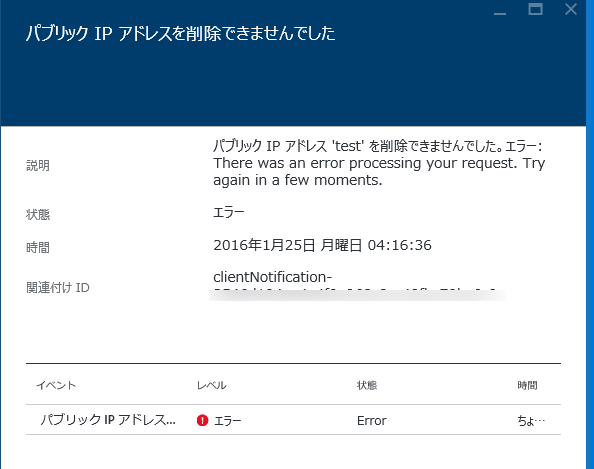
これで削除不可になりました。実際に削除してみるとエラーが発生して削除することができません。(サブスクリプションの所有者でも!)
ロックを解除(削除)するには Remove-AzureRmResourceLock を使用します。
> Remove-AzureRmResourceLock -LockName samplelock -ResourceName test -ResourceType Microsoft.Network/publicIPAddresses -ResourceGroupName testgroup
ロックはARMテンプレート内でも利用できます。
うまく活用して不慮の事故を未然に防ぎましょう。
See Also:
AzureのRecource Manager (ARM)ではリソースに細かな権限をつけて制御することが可能です。主にRBAC(Role Base Access Control)と言われてるやつですね。
それと連動して、実はポリシーを定義してより細かな制御ができるようになっています。(ただしポリシーは現状プレビュー機能)
セミナーの詳細よくわかってなかったのですが、ARMの基本的な体験ができるハンズオンが公開されました。
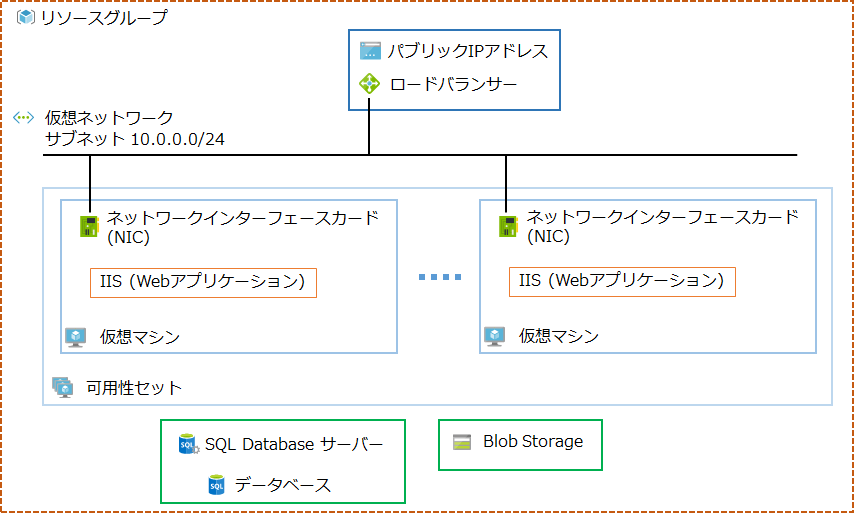
ハンズオンでは最終的にSQL Databaseを使った複数台で負荷分散する仮想マシン上のWebアプリケーションをテンプレートを使ってデプロイという感じです。
ざっくり図にするとこういう感じです。
演習で使うテンプレートなどはこちらにおいてます。
まぁ練習用なのですごくシンプルです。最低限のことしかしてません。
演習ではデプロイの方法を学ぶというか触れてもらう意味合いのほうが強いので、テンプレートをゼロから起こしたりといった内容ではありません。あしからず。。
あとは何だろう、CloudFormationのTipsなども参考にするといいかもしれませんね。ただまぁJSONをべたべた書くのはなかなか苦行なのでVisual Studio使うのがいいかと思います。。。
Azure Resource Managerのテンプレート集を使うとVMv2などの構成を簡単(?)に行うことができます。
ただ見てるとMarketplaceに公開されてるカスタムVMイメージなどを使ったテンプレートがなさげです。
※ こんな感じで普通にやるとエラーになるわけです
Marketplaceの場合も通常の場合もOSImageにはパブリッシャー、オファー、SKU、バージョンの指定が必要なのですがMarketplaceの場合は追加の課金が発生する可能性もあり、個別にPlanも指定する必要があります。
※ オファーやSKUなどは Get-AzureRmVMImageOffer などを使って取得すればいいでしょう
Get-AzureRmVMImageSku

コマンド パイプライン位置 1 のコマンドレット Get-AzureRmVMImageSku
次のパラメーターに値を指定してください:
Location: Japan West
PublisherName: miracl_linux
Offer: asianux-server-4-sp4

Skus          Offer                PublisherName Location  Id
----          -----                ------------- --------  --
axs4sp4licazu asianux-server-4-sp4 miracl_linux  japanwest /Subscriptions/5ffe5ad0-6dfc-4e3e-b44e-f4297c930546/Pro...
具体的にはVirtual Machineのリソースに以下のようにplanも追加してあげます。
    {
      "apiVersion": "2015-06-15",
      "type": "Microsoft.Compute/virtualMachines",
      "name": "[variables('vmName')]",
      "location": "[variables('location')]",
      "plan": {
        "name": "axs4sp4licazu",
        "publisher": "miracl_linux",
        "product": "asianux-server-4-sp4"
      },
      "dependsOn": [
        "[concat('Microsoft.Storage/storageAccounts/', parameters('newStorageAccountName'))]",
        "[concat('Microsoft.Network/networkInterfaces/', variables('nicName'))]"
      ],
      "properties": {
        "hardwareProfile": {
          "vmSize": "[variables('vmSize')]"
        },
        "osProfile": {
          "computerName": "[variables('vmName')]",
          "adminUsername": "[parameters('adminUsername')]",
          "adminPassword": "[parameters('adminPassword')]"
        },
        "storageProfile": {
          "imageReference": {
            "publisher": "[variables('imagePublisher')]",
            "offer": "[variables('imageOffer')]",
            "sku": "[parameters('ubuntuOSVersion')]",
            "version": "latest"
          },
          "osDisk": {
            "name": "[variables('OSDiskName')]",
            "vhd": {
              "uri": "[concat('http://',parameters('newStorageAccountName'),'.blob.core.windows.net/',variables('vmStorageAccountContainerName'),'/',variables('OSDiskName'),'.vhd')]"
            },
            "caching": "ReadWrite",
            "createOption": "FromImage"
          }
        },
        "networkProfile": {
          "networkInterfaces": [
            {
              "id": "[resourceId('Microsoft.Network/networkInterfaces',variables('nicName'))]"
            }
          ]
        }
      }
    }
publisher はそのままpublisherを、nameにはskuを、productにはofferに入れる値を入れておけばいいかと。(厳密には違うかもしれませんが)
※ 確実に知りたい場合はPreviewポータル上で該当のVirtual Machineを展開後、ARMExplorerなどで見るといいかもしれません。
これでエラーは回避して問題なくデプロイできます。
意外とハマるかもしれませんが、REST APIやAzure PowerShell/CLIでMarketplaceを利用する場合、事前に使用許諾を了承しておく必要があります。

Previewポータル上でMarketplaceから対象のものを開き、一番下にあるリンク(Want to deploy programmatically?)をクリックし、対象サブスクリプションをEnableにしておきます。※当然追加の料金が発生する場合があるので注意が必要です。
またデプロイに成功した後、購入した旨のメールが届きます。(料金が発生しなかったとしても)
以下のようなアナウンスがされています。
もともとASM(Azure Service Management)とARM(Azure Resource Management)の2種類あってSwitch-AzureModeでモードをかえつつ使ってたのですが、2015年9月25日をターゲットに削除する予定のようです。
当初、Cmdletを同じにそろえようとしてたのですが議論の末、AzureRMという統一した名称になるようです。
[Verb]-Azure[Noun]なのが[Verb]-AzureRM[Noun]ですね。(Get-AzureRMVmのような感じで動詞と名詞(サービスやリソースなど)という感じです)
あとはモジュールの分割、PowerShell Gallery経由でのARMモジュールの配布、自動化されたドキュメントのMSDNへの追加などが予定されてるようです。
もともとARMへの移行が推奨されてた感じではありますが、今は過渡期ということでもろもろ変わることを前提にしておく必要があります。
なぜ変えるのか?というところですがまぁSwitch-AzureModeでModal/Statefulな挙動に不満が多かったんでしょうね。そもそも中途半端ですし。まぁそういうことで将来的な基盤を提供したいから破壊的変更させてくださいという感じです。
細かい理由やロードマップは最初に挙げたGitHubのページを参照ください。
まぁ個人的には早く全部ARMで管理できるようになることと、Azure Portalでフルコントロールできること、Azure PowerShellももっとシンプルになることを望みます。(ASMが無くなればもっとシンプルになるんだけど)
Azure Resource Manager(ARM)を使った管理はAzureポータルなどを使うことで透過的に操作できますが、テンプレート作成に必要な情報(JSONの記述内容など)を集めようとするとなかなか難しいところがあります。現状、そういった場合に簡単なのはARM Explorerを利用する方法です。
このサイトを使うと全リソースをJSONで見ることができます。(モードをReadWriteにすると編集も可能)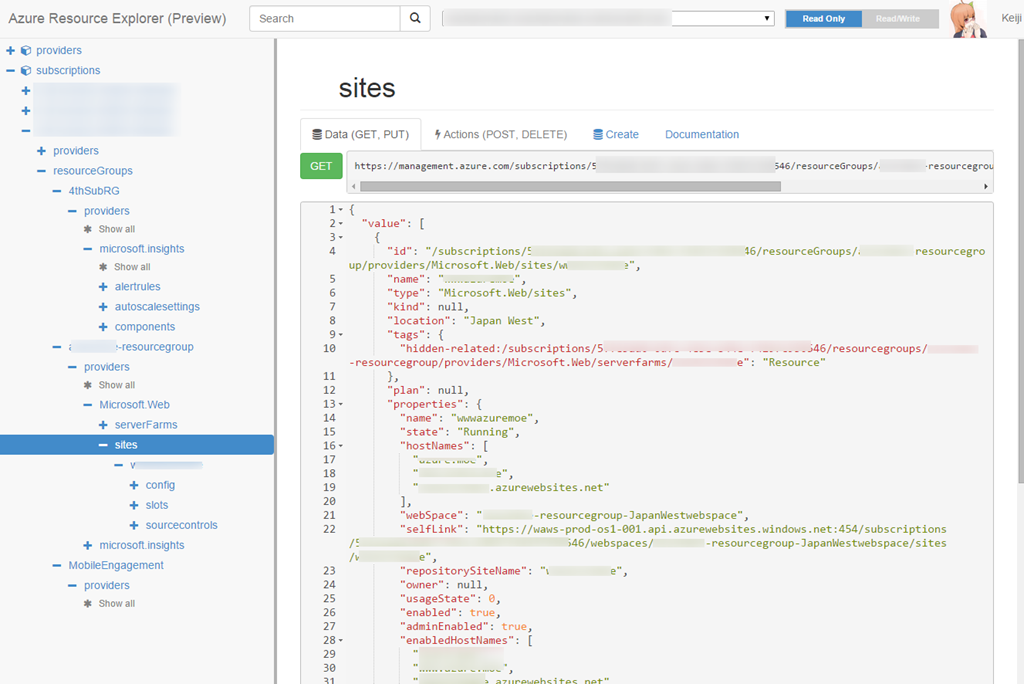
こういったツールを使ってリソースを眺めてJSON書いていくことは可能なのですが、やはりここはツールのサポートが欲しいところです。というわけで本題ですが、Visual Studio 2013/2015RCとAzure SDK 2.6を使うとそのあたりが簡単ですよ、というお話です。
Azure SDK 2.6 for Visual Studioをインストールすると、Visual Studioを使ってARMのテンプレート作成・編集やデプロイが簡単に行えるようになります。
新規プロジェクト作成でARMのテンプレートがあるのでまずは選びましょう。
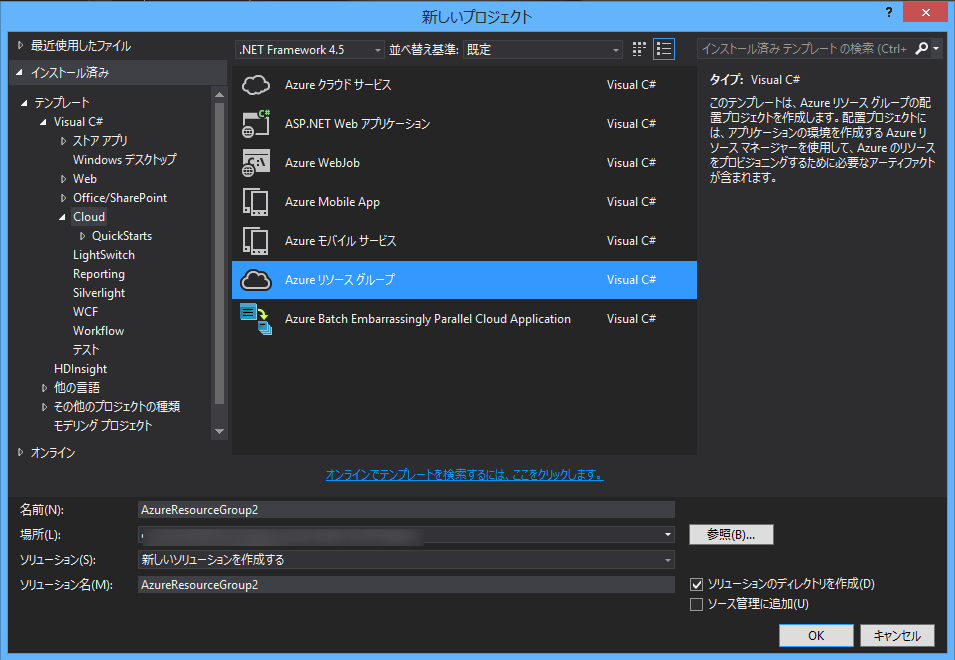
選択後、基本となるテンプレートを選ぶことができます。
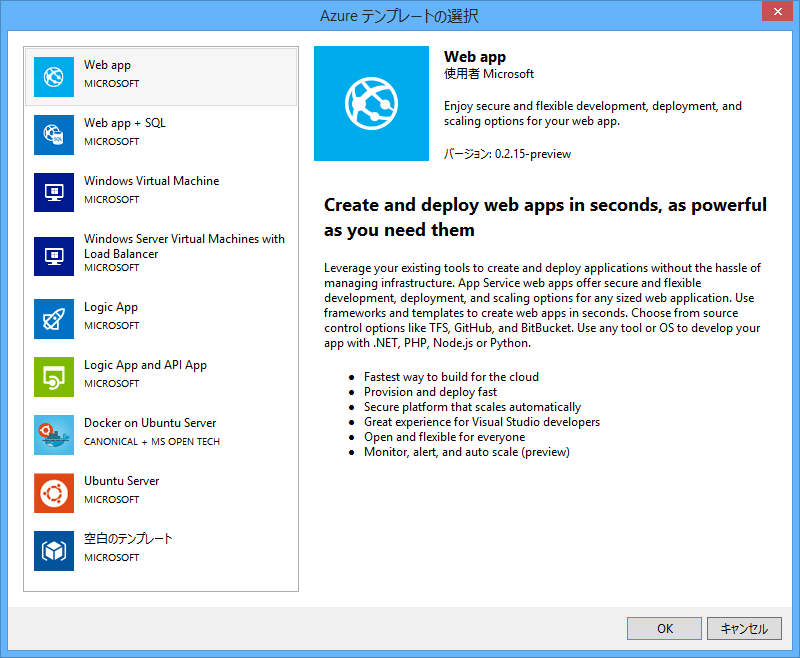
Virtual Machinesもあるのでうれしいですね(?)
とりあえずWeb appで作ってみましょう。
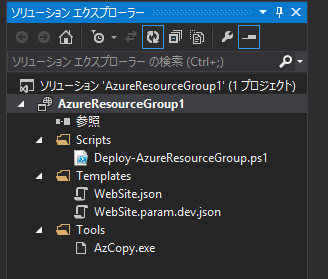
ソリューションにはデプロイ用のPowerShellスクリプト、それからテンプレートのJSON(とパラメーター用のJSON)、AzCopyが含まれます。
※実際にデプロイするにはAzure PowerShellが必要になるので最新版入れておきましょう。
結局JSONを手書き、、、と思いましたか?いいえ、そこはVisual Studioの補助が効きます。
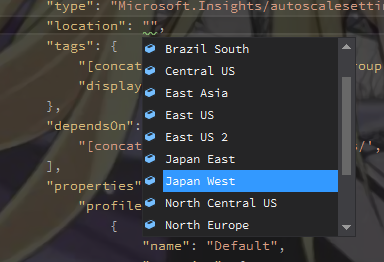
JSONスキーマがあるのでKeyと値候補など入力補完できます。これだけ?いいえ。テンプレートの.json開いて「表示」-「その他のウィンドウ」-「JSON アウトライン」を表示してみましょう。

今設定されているパラメーターやARMのリソースを見ることができます。選択したリソースがハイライトされたりわかりやすいですね。
またJSON アウトラインからリソースを追加することもできます。
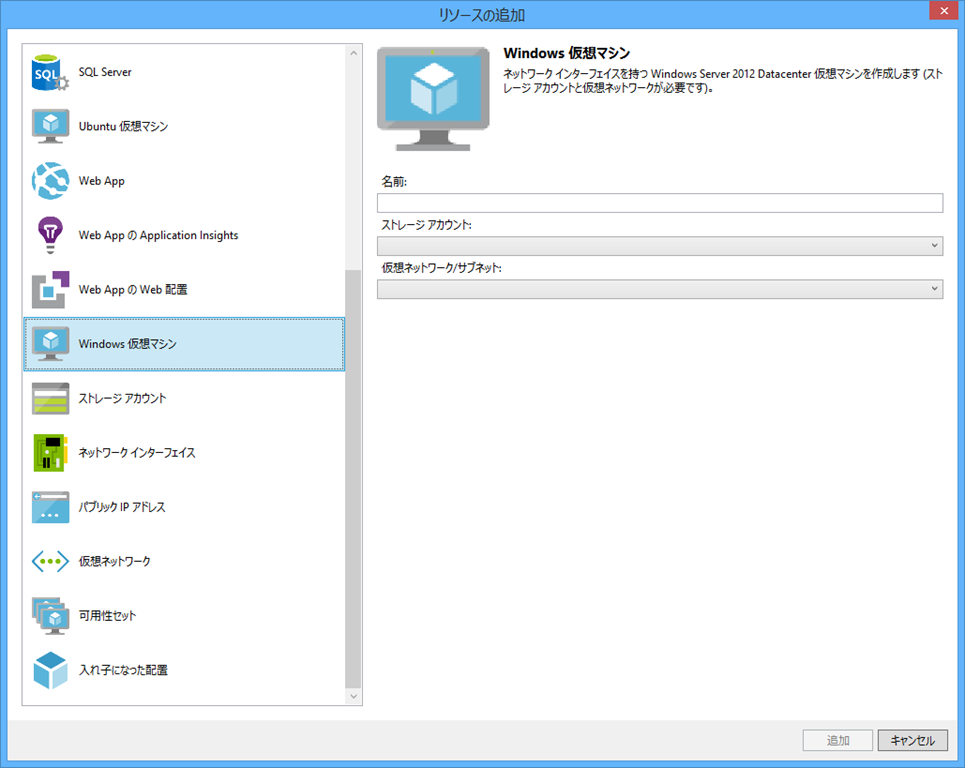
VM v2にも対応してるので仮想マシンに関連するリソースの追加も簡単ですね。
後はいろいろテンプレートを作り上げてデプロイする場合はプロジェクトのコンテキストメニューから配置を選べばそのままデプロイできます。

デプロイダイアログが表示されるので、対象のサブスクリプションやリソースグループを選んで作成したテンプレート(とテンプレートパラメーターファイル)を選びます。

パラメーターは個別に設定できるのでいいですね。「配置」ボタンクリックで配置が開始されます。(ウィンドウ閉じないのでよくわからないけど)
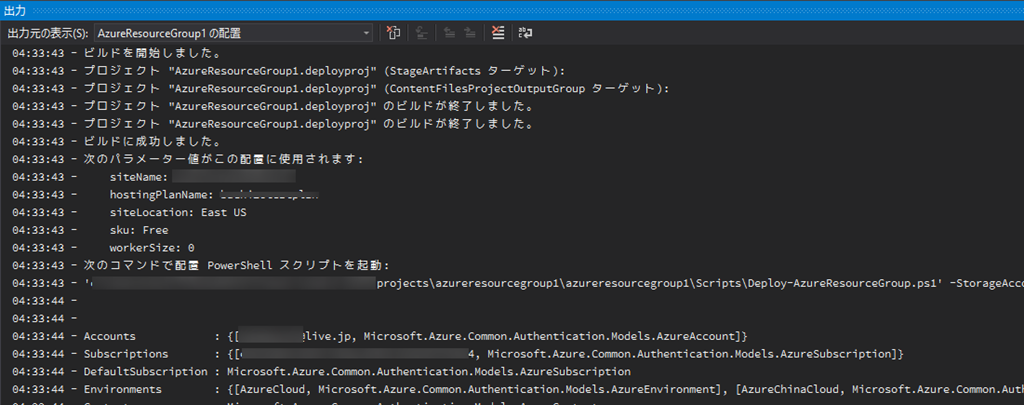
04:33:43 - ビルドを開始しました。
04:33:43 - プロジェクト "AzureResourceGroup1.deployproj" (StageArtifacts ターゲット):
04:33:43 - プロジェクト "AzureResourceGroup1.deployproj" (ContentFilesProjectOutputGroup ターゲット):
04:33:43 - プロジェクト "AzureResourceGroup1.deployproj" のビルドが終了しました。
04:33:43 - プロジェクト "AzureResourceGroup1.deployproj" のビルドが終了しました。
04:33:43 - ビルドに成功しました。
04:33:43 - 次のパラメーター値がこの配置に使用されます:
04:33:43 -     siteName: xxxxxxxwebsite
04:33:43 -     hostingPlanName: xxxxxxxxtestplan
04:33:43 -     siteLocation: East US
04:33:43 -     sku: Free
04:33:43 -     workerSize: 0
04:33:43 - 次のコマンドで配置 PowerShell スクリプトを起動:
04:33:43 - 'xxxxxx\azureresourcegroup1\azureresourcegroup1\Scripts\Deploy-AzureResourceGroup.ps1' -StorageAccountName '' -ResourceGroupName 'AzureResourceGroup1' -ResourceGroupLocation 'eastus' -TemplateFile 'xxxxx\azureresourcegroup1\azureresourcegroup1\templates\website.json' -TemplateParametersFile 'xxxxxxx\projects\azureresourcegroup1\azureresourcegroup1\templates\website.param.dev.json'
04:33:44 -
04:33:44 -
04:33:44 - Accounts            : {[xxxxx@live.jp, Microsoft.Azure.Common.Authentication.Models.AzureAccount]}
04:33:44 - Subscriptions       : {[xxxxxxxxxxxxxxxx, Microsoft.Azure.Common.Authentication.Models.AzureSubscription]}
04:33:44 - DefaultSubscription : Microsoft.Azure.Common.Authentication.Models.AzureSubscription
04:33:44 - Environments        : {[AzureCloud, Microsoft.Azure.Common.Authentication.Models.AzureEnvironment], [AzureChinaCloud, Microsoft.Azure.Common.Authentication.Models.AzureEnvironment]}
04:33:44 - Context             : Microsoft.Azure.Common.Authentication.Models.AzureContext
04:33:44 - ProfileLoadErrors   :
04:33:44 - ProfilePath         :
04:33:44 -
04:34:06 - [VERBOSE] 4:34:06 - Created resource group 'AzureResourceGroup1' in location 'eastus'
04:34:07 - [VERBOSE] 4:34:07 - Template is valid.
04:34:10 - [VERBOSE] 4:34:10 - Create template deployment 'website'.
04:34:19 - [VERBOSE] 4:34:19 - Resource Microsoft.Web/serverfarms 'xxxxxtestplan' provisioning status is succeeded
04:34:22 - [VERBOSE] 4:34:22 - Resource Microsoft.Insights/alertrules 'CPUHigh buchizotestplan' provisioning status is succeeded
04:34:22 - [VERBOSE] 4:34:22 - Resource Microsoft.Insights/alertrules 'LongHttpQueue buchizotestplan' provisioning status is succeeded
04:34:31 - [VERBOSE] 4:34:31 - Resource Microsoft.Web/sites 'buchizotestwebsite' provisioning status is succeeded
04:34:31 - [VERBOSE] 4:34:31 - Resource Microsoft.Insights/autoscalesettings 'buchizotestplan-AzureResourceGroup1' provisioning status is succeeded
04:34:35 - [VERBOSE] 4:34:35 - Resource Microsoft.Insights/alertrules 'ServerErrors buchizotestwebsite' provisioning status is succeeded
04:34:41 - [VERBOSE] 4:34:41 - Resource Microsoft.Insights/alertrules 'ForbiddenRequests buchizotestwebsite' provisioning status is succeeded
04:34:41 - [VERBOSE] 4:34:41 - Resource Microsoft.Insights/components 'buchizotestwebsite' provisioning status is succeeded
04:34:50 - ResourceGroupName : AzureResourceGroup1
04:34:50 - Location          : eastus
04:34:50 - Resources         : {CPUHigh xxxxxxtestplan, ForbiddenRequests xtxxxestwebsite, LongHttpQueue xxxxxxtestplan, ServerErrors xxxxtestwebsite...}
04:34:50 - ResourcesTable    :
04:34:50 -                     Name                                  Type                                  Location
04:34:50 -                     ====================================  ====================================  =========
04:34:50 -                     CPUHigh xxxxtestplan               Microsoft.Insights/alertrules         eastus
04:34:50 -                     ForbiddenRequests xxxxtestwebsite  Microsoft.Insights/alertrules         eastus
04:34:50 -                     LongHttpQueue xxxxtestplan         Microsoft.Insights/alertrules         eastus
04:34:50 -                     ServerErrors xxxxtestwebsite       Microsoft.Insights/alertrules         eastus
04:34:50 -                     xxxtestplan-AzureResourceGroup1   Microsoft.Insights/autoscalesettings  eastus
04:34:50 -                     xxxxtestwebsite                    Microsoft.Insights/components         centralus
04:34:50 -                     xxxxtestplan                       Microsoft.Web/serverFarms             eastus
04:34:50 -                     xxxxtestwebsite                    Microsoft.Web/sites                   eastus
04:34:50 -
04:34:50 - ProvisioningState : Succeeded
04:34:50 - Permissions       : {Microsoft.Azure.Commands.Resources.Models.Authorization.PSPermission}
04:34:50 - PermissionsTable  :
04:34:50 -                     Actions  NotActions
04:34:50 -                     =======  ==========
04:34:50 -                     *
04:34:50 -
04:34:50 - Tags              : {}
04:34:50 - TagsTable         :
04:34:50 - ResourceId        : /subscriptions/xxxxxxxxxxxxxxxx/resourceGroups/AzureResourceGroup1
04:34:50 -
04:34:50 -
04:34:50 -
04:34:50 -
04:34:50 - テンプレート 'xxxxxxxxx\projects\azureresourcegroup1\azureresourcegroup1\templates\website.json' をリソース グループ 'AzureResourceGroup1' に正常に配置しました。
これだけです。実際にポータルでみると、指定した通り出来上がっています。
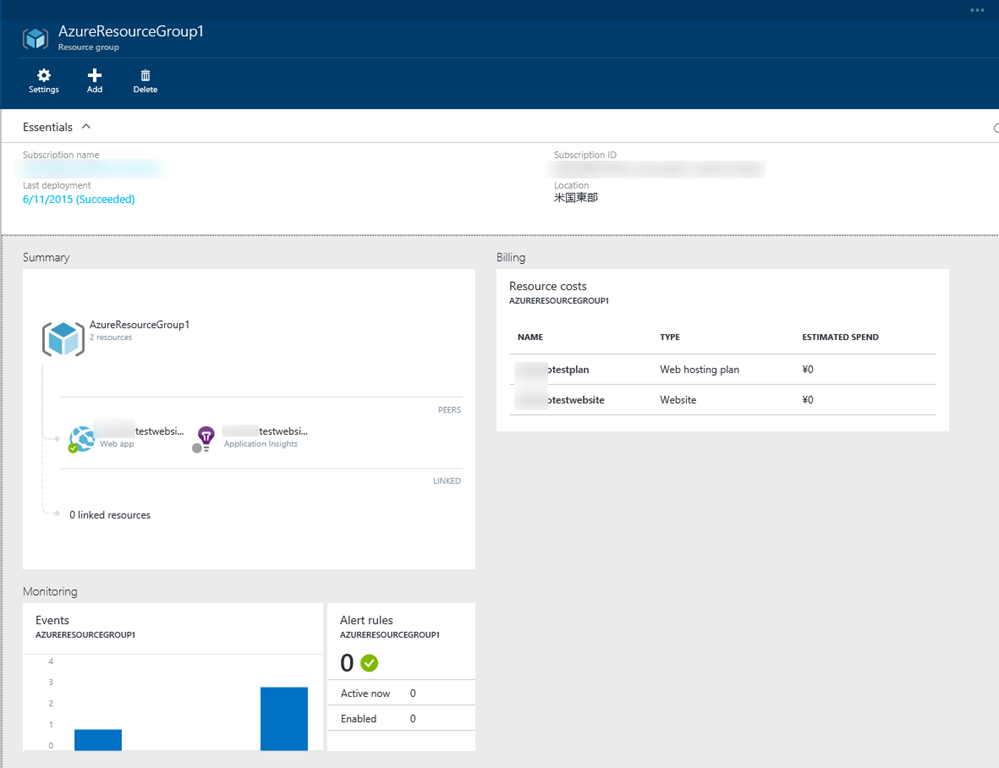
というわけでVisual Studioなどのツールを使って快適ARM生活を送ってくださいませ。
 ブチザッキ
ブチザッキ 