Azure Resource Manager(ARM)を使った管理はAzureポータルなどを使うことで透過的に操作できますが、テンプレート作成に必要な情報(JSONの記述内容など)を集めようとするとなかなか難しいところがあります。現状、そういった場合に簡単なのはARM Explorerを利用する方法です。
このサイトを使うと全リソースをJSONで見ることができます。(モードをReadWriteにすると編集も可能)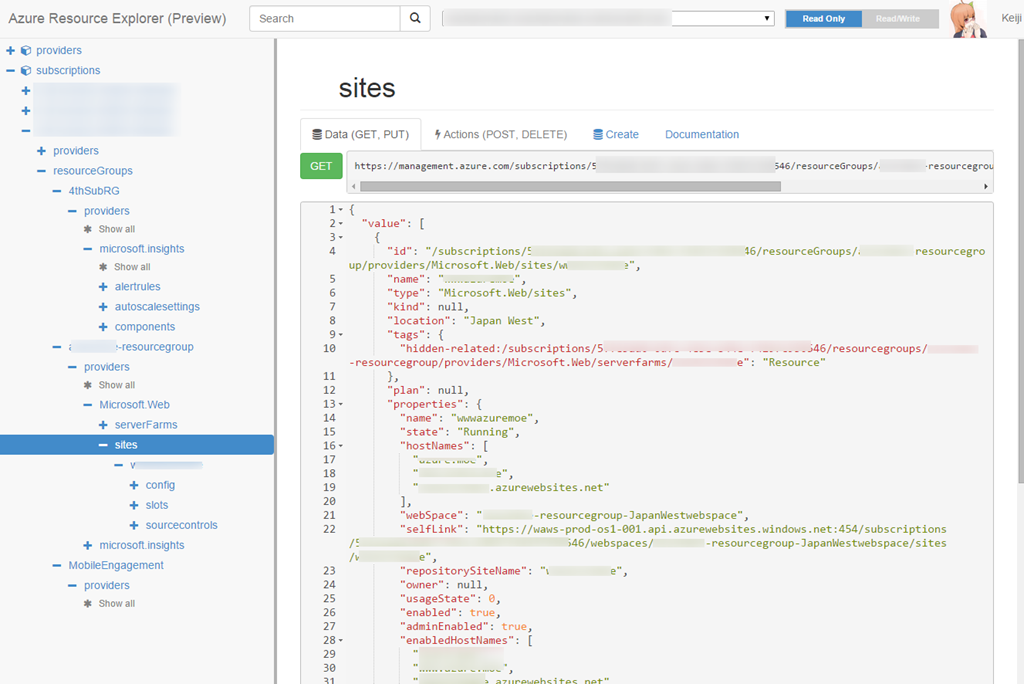
こういったツールを使ってリソースを眺めてJSON書いていくことは可能なのですが、やはりここはツールのサポートが欲しいところです。というわけで本題ですが、Visual Studio 2013/2015RCとAzure SDK 2.6を使うとそのあたりが簡単ですよ、というお話です。
Visual StudioによるARMサポート
Azure SDK 2.6 for Visual Studioをインストールすると、Visual Studioを使ってARMのテンプレート作成・編集やデプロイが簡単に行えるようになります。
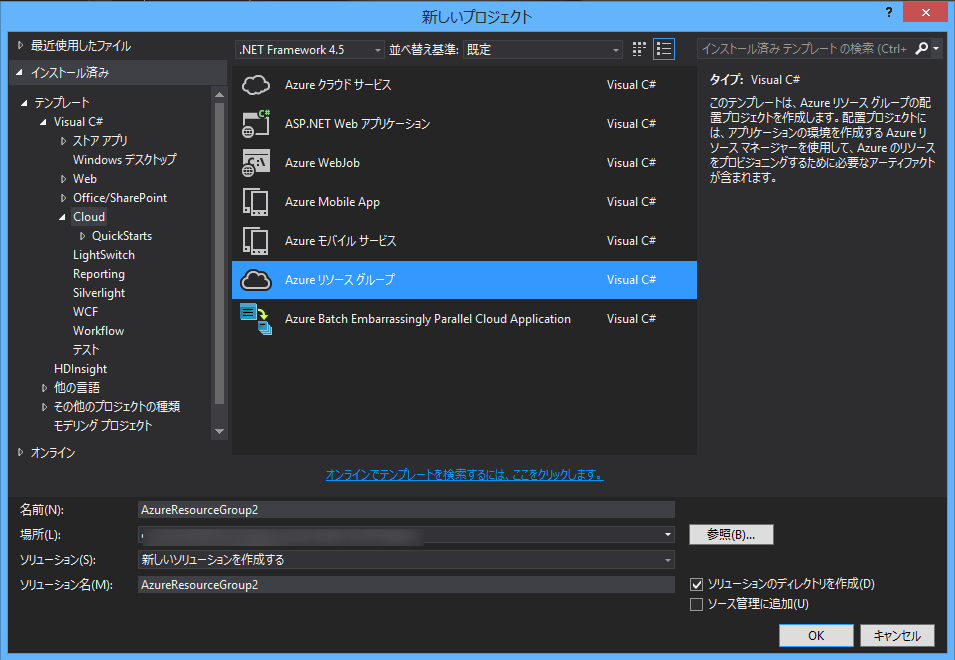
新規プロジェクト作成でARMのテンプレートがあるのでまずは選びましょう。
選択後、基本となるテンプレートを選ぶことができます。
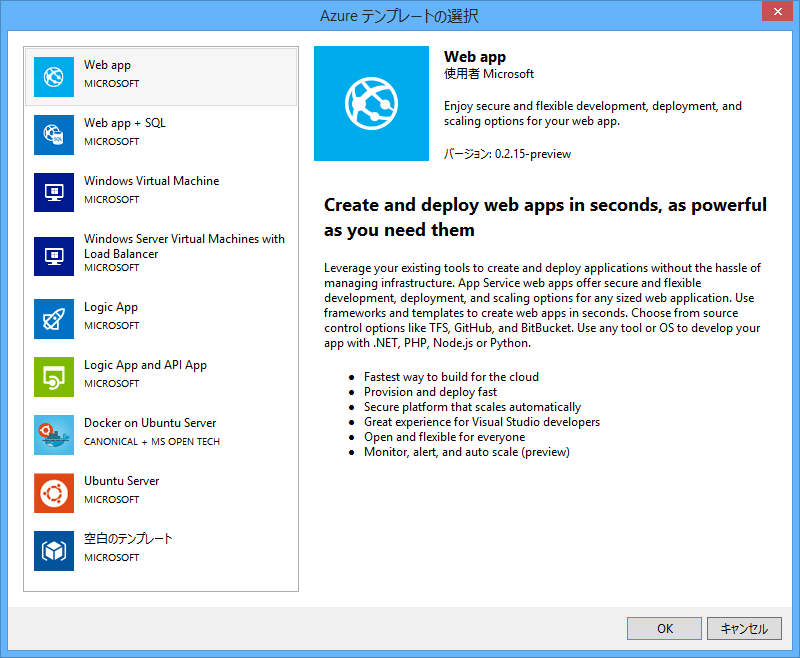
Virtual Machinesもあるのでうれしいですね(?)
とりあえずWeb appで作ってみましょう。
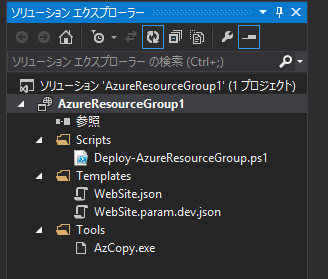
ソリューションにはデプロイ用のPowerShellスクリプト、それからテンプレートのJSON(とパラメーター用のJSON)、AzCopyが含まれます。
※実際にデプロイするにはAzure PowerShellが必要になるので最新版入れておきましょう。
結局JSONを手書き、、、と思いましたか?いいえ、そこはVisual Studioの補助が効きます。
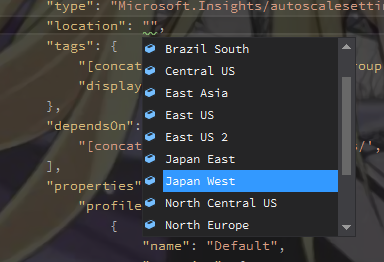
JSONスキーマがあるのでKeyと値候補など入力補完できます。これだけ?いいえ。テンプレートの.json開いて「表示」-「その他のウィンドウ」-「JSON アウトライン」を表示してみましょう。

今設定されているパラメーターやARMのリソースを見ることができます。選択したリソースがハイライトされたりわかりやすいですね。
またJSON アウトラインからリソースを追加することもできます。
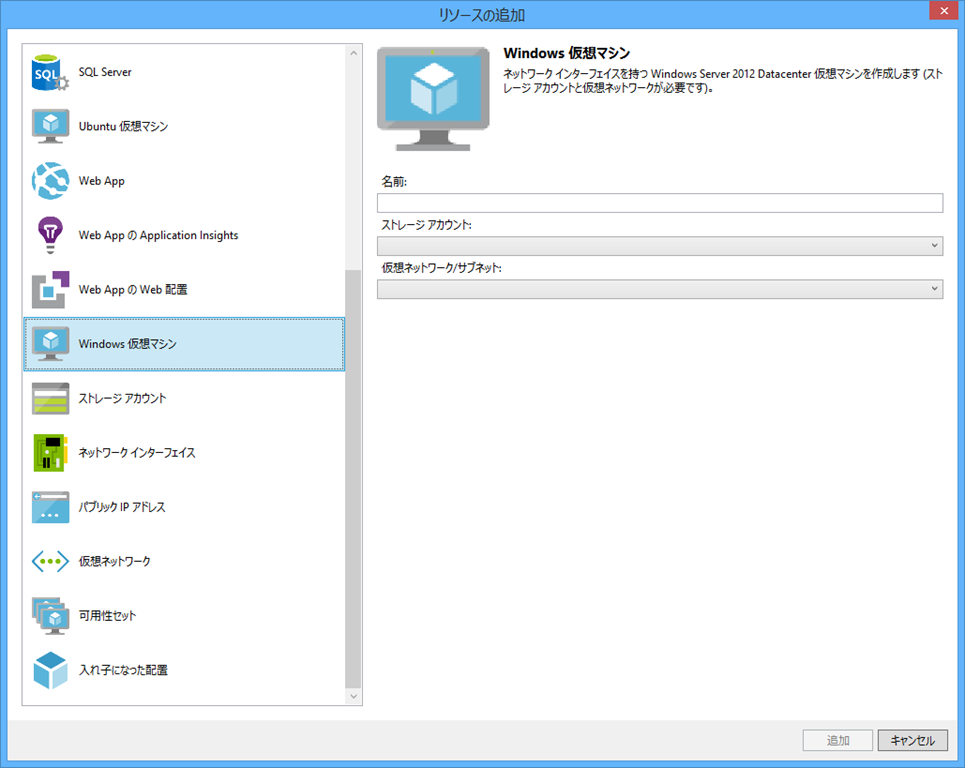
VM v2にも対応してるので仮想マシンに関連するリソースの追加も簡単ですね。
後はいろいろテンプレートを作り上げてデプロイする場合はプロジェクトのコンテキストメニューから配置を選べばそのままデプロイできます。

デプロイダイアログが表示されるので、対象のサブスクリプションやリソースグループを選んで作成したテンプレート(とテンプレートパラメーターファイル)を選びます。

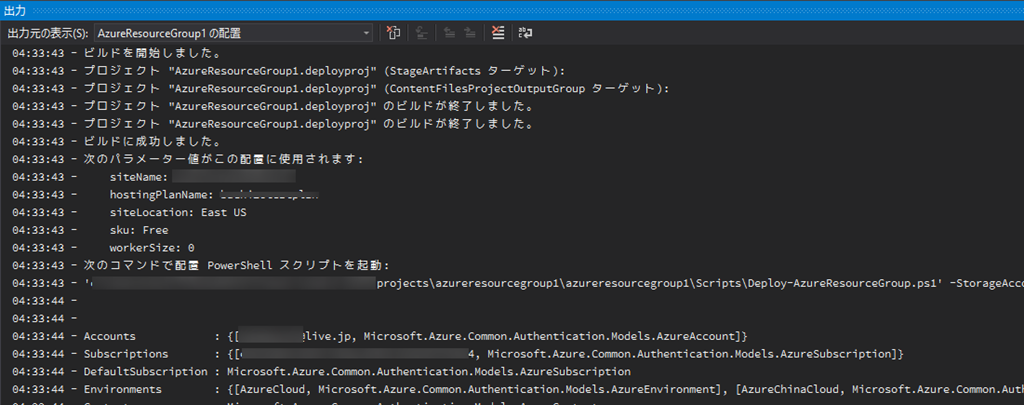
パラメーターは個別に設定できるのでいいですね。「配置」ボタンクリックで配置が開始されます。(ウィンドウ閉じないのでよくわからないけど)
04:33:43 - ビルドを開始しました。
04:33:43 - プロジェクト "AzureResourceGroup1.deployproj" (StageArtifacts ターゲット):
04:33:43 - プロジェクト "AzureResourceGroup1.deployproj" (ContentFilesProjectOutputGroup ターゲット):
04:33:43 - プロジェクト "AzureResourceGroup1.deployproj" のビルドが終了しました。
04:33:43 - プロジェクト "AzureResourceGroup1.deployproj" のビルドが終了しました。
04:33:43 - ビルドに成功しました。
04:33:43 - 次のパラメーター値がこの配置に使用されます:
04:33:43 -     siteName: xxxxxxxwebsite
04:33:43 -     hostingPlanName: xxxxxxxxtestplan
04:33:43 -     siteLocation: East US
04:33:43 -     sku: Free
04:33:43 -     workerSize: 0
04:33:43 - 次のコマンドで配置 PowerShell スクリプトを起動:
04:33:43 - 'xxxxxx\azureresourcegroup1\azureresourcegroup1\Scripts\Deploy-AzureResourceGroup.ps1' -StorageAccountName '' -ResourceGroupName 'AzureResourceGroup1' -ResourceGroupLocation 'eastus' -TemplateFile 'xxxxx\azureresourcegroup1\azureresourcegroup1\templates\website.json' -TemplateParametersFile 'xxxxxxx\projects\azureresourcegroup1\azureresourcegroup1\templates\website.param.dev.json'
04:33:44 -
04:33:44 -
04:33:44 - Accounts            : {[xxxxx@live.jp, Microsoft.Azure.Common.Authentication.Models.AzureAccount]}
04:33:44 - Subscriptions       : {[xxxxxxxxxxxxxxxx, Microsoft.Azure.Common.Authentication.Models.AzureSubscription]}
04:33:44 - DefaultSubscription : Microsoft.Azure.Common.Authentication.Models.AzureSubscription
04:33:44 - Environments        : {[AzureCloud, Microsoft.Azure.Common.Authentication.Models.AzureEnvironment], [AzureChinaCloud, Microsoft.Azure.Common.Authentication.Models.AzureEnvironment]}
04:33:44 - Context             : Microsoft.Azure.Common.Authentication.Models.AzureContext
04:33:44 - ProfileLoadErrors   :
04:33:44 - ProfilePath         :
04:33:44 -
04:34:06 - [VERBOSE] 4:34:06 - Created resource group 'AzureResourceGroup1' in location 'eastus'
04:34:07 - [VERBOSE] 4:34:07 - Template is valid.
04:34:10 - [VERBOSE] 4:34:10 - Create template deployment 'website'.
04:34:19 - [VERBOSE] 4:34:19 - Resource Microsoft.Web/serverfarms 'xxxxxtestplan' provisioning status is succeeded
04:34:22 - [VERBOSE] 4:34:22 - Resource Microsoft.Insights/alertrules 'CPUHigh buchizotestplan' provisioning status is succeeded
04:34:22 - [VERBOSE] 4:34:22 - Resource Microsoft.Insights/alertrules 'LongHttpQueue buchizotestplan' provisioning status is succeeded
04:34:31 - [VERBOSE] 4:34:31 - Resource Microsoft.Web/sites 'buchizotestwebsite' provisioning status is succeeded
04:34:31 - [VERBOSE] 4:34:31 - Resource Microsoft.Insights/autoscalesettings 'buchizotestplan-AzureResourceGroup1' provisioning status is succeeded
04:34:35 - [VERBOSE] 4:34:35 - Resource Microsoft.Insights/alertrules 'ServerErrors buchizotestwebsite' provisioning status is succeeded
04:34:41 - [VERBOSE] 4:34:41 - Resource Microsoft.Insights/alertrules 'ForbiddenRequests buchizotestwebsite' provisioning status is succeeded
04:34:41 - [VERBOSE] 4:34:41 - Resource Microsoft.Insights/components 'buchizotestwebsite' provisioning status is succeeded
04:34:50 - ResourceGroupName : AzureResourceGroup1
04:34:50 - Location          : eastus
04:34:50 - Resources         : {CPUHigh xxxxxxtestplan, ForbiddenRequests xtxxxestwebsite, LongHttpQueue xxxxxxtestplan, ServerErrors xxxxtestwebsite...}
04:34:50 - ResourcesTable    :
04:34:50 -                     Name                                  Type                                  Location
04:34:50 -                     ====================================  ====================================  =========
04:34:50 -                     CPUHigh xxxxtestplan               Microsoft.Insights/alertrules         eastus
04:34:50 -                     ForbiddenRequests xxxxtestwebsite  Microsoft.Insights/alertrules         eastus
04:34:50 -                     LongHttpQueue xxxxtestplan         Microsoft.Insights/alertrules         eastus
04:34:50 -                     ServerErrors xxxxtestwebsite       Microsoft.Insights/alertrules         eastus
04:34:50 -                     xxxtestplan-AzureResourceGroup1   Microsoft.Insights/autoscalesettings  eastus
04:34:50 -                     xxxxtestwebsite                    Microsoft.Insights/components         centralus
04:34:50 -                     xxxxtestplan                       Microsoft.Web/serverFarms             eastus
04:34:50 -                     xxxxtestwebsite                    Microsoft.Web/sites                   eastus
04:34:50 -
04:34:50 - ProvisioningState : Succeeded
04:34:50 - Permissions       : {Microsoft.Azure.Commands.Resources.Models.Authorization.PSPermission}
04:34:50 - PermissionsTable  :
04:34:50 -                     Actions  NotActions
04:34:50 -                     =======  ==========
04:34:50 -                     *
04:34:50 -
04:34:50 - Tags              : {}
04:34:50 - TagsTable         :
04:34:50 - ResourceId        : /subscriptions/xxxxxxxxxxxxxxxx/resourceGroups/AzureResourceGroup1
04:34:50 -
04:34:50 -
04:34:50 -
04:34:50 -
04:34:50 - テンプレート 'xxxxxxxxx\projects\azureresourcegroup1\azureresourcegroup1\templates\website.json' をリソース グループ 'AzureResourceGroup1' に正常に配置しました。
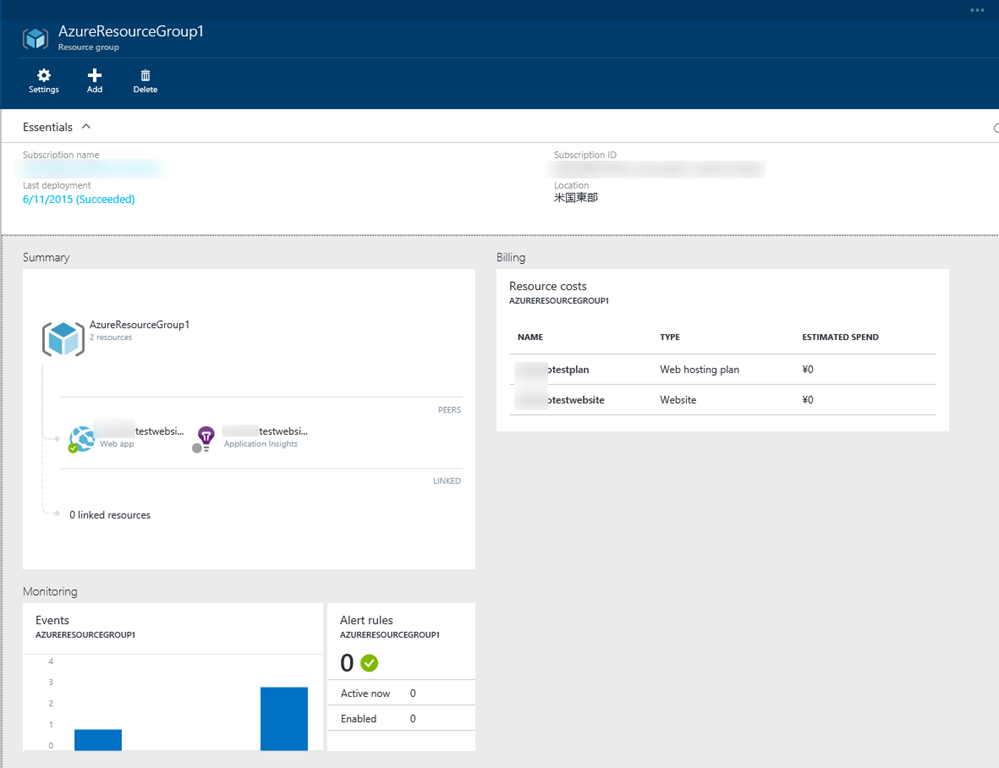
これだけです。実際にポータルでみると、指定した通り出来上がっています。
まとめ
というわけでVisual Studioなどのツールを使って快適ARM生活を送ってくださいませ。
 ブチザッキ
ブチザッキ 