Azure ML StudioのPrompt Flowで実行結果やバッチ実行結果を見ることができるのですが、CSVなりで操作したい時に結果をダウンロードできるとうれしいですよね。
標準でExport機能があるのですが、なぜか1ページ25件固定で現在表示中のページの内容のダウンロードか、全件ダウンロード用スクリプトを取得するかの2択になってます。
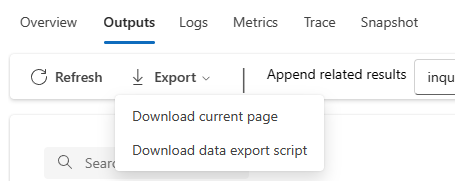
で、Download data export script を選択するとダウンロード用のJupyter Notebook(.ipynb)が得られます。AzureサブスクリプションIDとかワークスペース名や対象の実行結果名など必要情報は埋まっているので普通は順番にセルを実行していくだけでダウンロードできるのですが、Azureにアクセスするアカウントが複数テナントに参加していて、MLのワークスペースがあるテナントが既定じゃない場合といった状況だと認証エラーになるんですよね。(あるある)
という状況の時のワークアラウンドです。対応は簡単でダウンロードしたスクリプトのGet workspaceのセル内の Workspace.getメソッドにテナントIDを含めた認証情報を渡せばOKという感じです。
# Get a logger which allows us to log events that occur when running the program.
logger = logging.getLogger("myLogger")
logger.setLevel(logging.DEBUG)
formatter = logging.Formatter("%(asctime)s %(message)s")
ch = logging.StreamHandler()
ch.setFormatter(formatter)
ch.setLevel(logging.DEBUG)
if not logger.handlers:
    logger.addHandler(ch)
# ここが追加する部分
from azureml.core.authentication import InteractiveLoginAuthentication
interactive_auth = InteractiveLoginAuthentication(tenant_id="対象のテナントID")
# ここまで
# Get the workspace associated with your personal token and get the relavant datastore.
subscription_id = "xxxxxxxxxxxxxx"
resource_group = "xxxxxxxxxxxxx"
workspace_name = "xxxxxxxxx"

# auth引数を追加する
ws = Workspace.get(workspace_name, subscription_id=subscription_id, resource_group=resource_group, auth=interactive_auth)
region = ws.location
default_datastore = ws.get_default_datastore()
上記のように変更して実行すればブラウザで認証する際に指定テナントIDに対して認証するようになります。(今回はブラウザで対人でいいのでInteractiveにしましたが他の方法でも修正すればいけると思います)
一応何とかしてってフィードバックしましたけどどうでしょうね。。
 ブチザッキ
ブチザッキ 